> For the complete documentation index, see [llms.txt](https://www.mlcompendium.com/llms.txt). Markdown versions of documentation pages are available by appending `.md` to page URLs; this page is available as [Markdown](https://www.mlcompendium.com/natural-language-processing-nlp/string-matching.md).
# String Matching
Name matching is one case of a broader need: deciding whether two strings are close, or finding a pattern inside a lot of text fast. The page starts with fuzzy matching tools built on edit distance and sequence comparison, then moves to regex engines, their speed, and the keyword-extraction alternatives that skip regex altogether.
The same notes are in [Name Matching](/natural-language-processing-nlp/name-matching.md) and [SIMILARITY](/data/processing-intro/feature-engineering.md#similarity).
## Tools
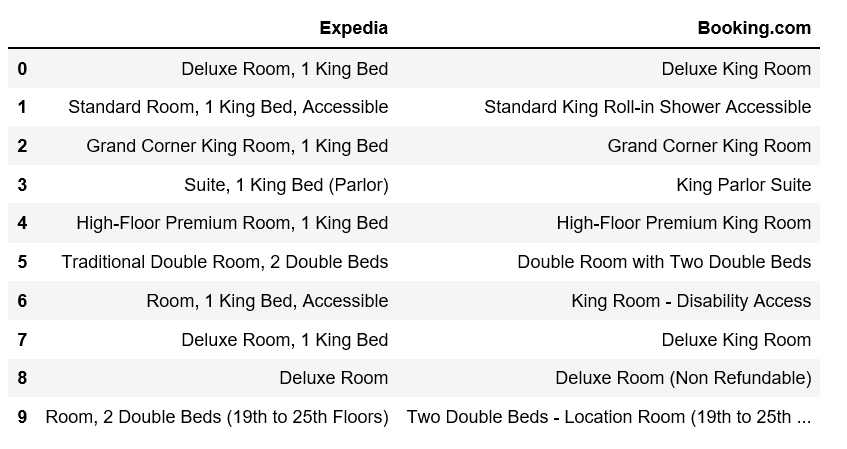
The simplest notion of "close" is edit distance. [Fuzzy string matching library - fuzzywuzzy - using edit-distance](https://medium.com/data-science/natural-language-processing-for-fuzzy-string-matching-with-python-6632b7824c49) is Susan Li's NLP for fuzzy string matching with Python. The standard library has its own tool: [Difflib](https://docs.python.org/3/library/difflib.html) provides classes and functions for comparing sequences, mostly sequences of text lines, and [difflib-2](https://pymotw.com/2/difflib/) is the Python Module of the Week walkthrough of comparing sequences with it.
Susan Li, Fuzzy Wuzzy String Matching, medium.com
The figure is from Susan Li's fuzzy wuzzy string matching post on medium.com.
## REGEX
Fuzzy matching compares two strings; regex searches for a pattern, and at scale the question becomes which engine is fast enough. [Why re is slow](https://swtch.com/~rsc/regexp/regexp1.html) is "Regular Expression Matching Can Be Simple And Fast", the explanation of why backtracking engines lose. The numbers come next: [Benchmark](https://github.com/mariomka/regex-benchmark) is a simple regex benchmark of different programming languages, [comparisons](https://rust-leipzig.github.io/regex/2017/03/28/comparison-of-regex-engines/) is the Rust Leipzig Users' comparison of regex engines, [more](https://stackoverflow.com/questions/3544225/regular-expression-library-benchmarks) is the Stack Overflow question on regular expression library benchmarks beyond the browser, and [many more](https://stackoverflow.com/questions/11033190/regex-library-benchmark) asks for an up-to-date benchmark of re2, pcre with jit, and other contemporary libraries.
Two practical regex notes sit beside the benchmarks. [Split on separator but keep the separator](http://programmaticallyspeaking.com/split-on-separator-but-keep-the-separator-in-python.html) is Per's Python post on splitting a file's lines while keeping the separator. [Semantic versioning](https://regexr.com/39s32) is a pattern on RegExr, the online tool to learn, build, and test regular expressions.
When the standard engine is too slow, two libraries are the usual replacements:
5. [Hyperscan](https://github.com/intel/hyperscan) — [Hyperscan](https://www.hyperscan.io/) [(paper)](https://www.usenix.org/system/files/nsdi19-wang-xiang.pdf) is a high-performance multiple regex matching library. It follows the regular expression syntax of the commonly-used libpcre library, but is a standalone library with its own C API. The paper frames regex matching as the performance bottleneck of network security applications, since every byte of packet payload has to be scanned.
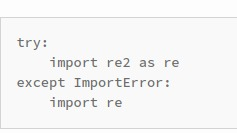
6. [Re2](https://github.com/google/re2) — [python](https://pypi.org/project/re2/) This is the source code repository for RE2, a regular expression library. RE2 is a fast, safe, thread-friendly alternative to backtracking engines like those in PCRE, Perl, and Python, written in C++, and the python link is a Cython wrapper for it.
Regex library comparison.
The comparison above puts those libraries side by side. Sometimes the pattern is really a token rule or a keyword list, and then regex is the wrong tool. [Spacy’s Matcher & “regex”](https://spacy.io/usage/rule-based-matching) is spaCy's rule-based matching, which finds phrases and tokens and matches entities. [Flashtext](https://github.com/vi3k6i5/flashtext)— This module can be used to replace keywords in sentences or extract keywords from sentences. It is based on the [FlashText algorithm](https://arxiv.org/abs/1711.00046), described in the paper "Replace or Retrieve Keywords In Documents at Scale".
The fuzzywuzzy post from the tools section is also linked at its older address: Fuzzy string matching library - fuzzywuzzy - using edit-distance
## Deprecated links
{% hint style="warning" %}
These links and images no longer work. The original wording is kept here. A same-resource copy, when one was checked, is used above.
{% endhint %}
* Re2 This address no longer opens:
---
# Agent Instructions
This documentation is published with GitBook. GitBook is the documentation platform designed so that both humans and AI agents can read, navigate, and reason over technical content effectively. Learn more at gitbook.com.
## Querying This Documentation
If you need additional information that is not directly available in this page, you can query the documentation by asking a question.
Perform an HTTP GET request on the following URL with the `ask` and `goal` query parameters:
```
GET https://www.mlcompendium.com/natural-language-processing-nlp/string-matching.md?ask=&goal=
```
`ask` is the immediate question: it should be specific, self-contained, and written in natural language.
`goal` is what the user is ultimately trying to achieve, the reason they need the answer. Sharing it helps GitBook give you a better, more relevant answer. A goal is most helpful when it describes the outcome the user wants rather than restating the question. For example, with `ask=how do I create an API token`, a goal like `automate deployments from our CI pipeline` lets GitBook tailor the answer to that use case.
The response will contain a direct answer to the question and relevant excerpts and sources from the documentation.
Use this mechanism when the answer is not explicitly present in the current page, you need clarification or additional context, or you want to retrieve related documentation sections.